Optimizing New Customer Profile Page

Period

2023.04 - 2023.11

Team

ChartMogul

Tools

Figma, Notion, Slack

Project Overview

Improve the design after renewal of the profile page for B2B customers

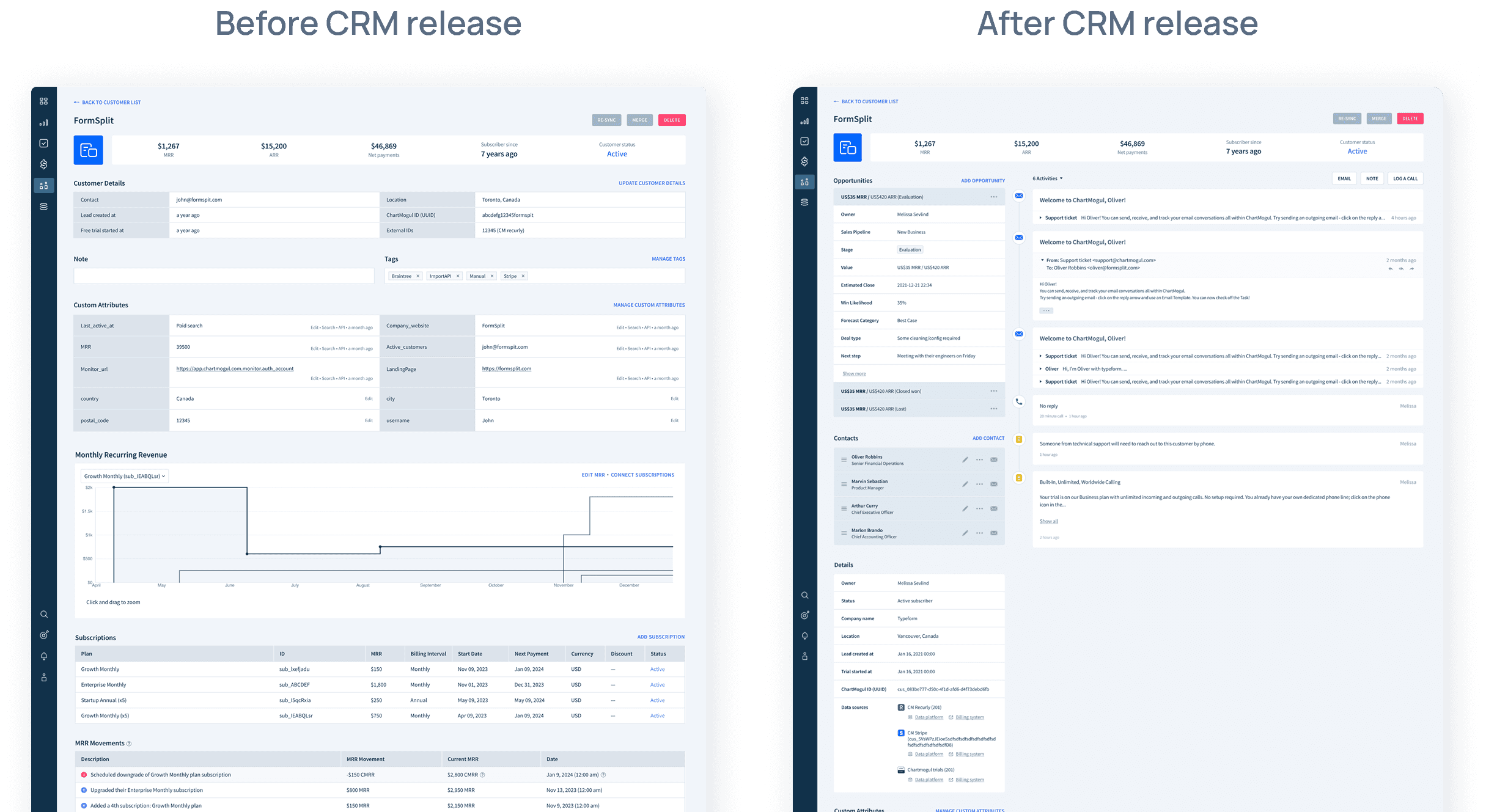
Since the introduction of the CRM feature at ChartMogul, a leading B2B SaaS company, we witnessed a significant transformation in the layout of our existing customer page. While these changes were well-received by CRM enthusiasts, we took note of feedback from users who didn't actively utilize this feature. Their concerns centered on the design not catering to their specific needs. In response, we embarked on a mission to refine the new customer page, ensuring that all users could effortlessly access vital information in a more compact format.

My contribution
My contribution

As a product designer, I initiated the process by conceptualizing a design wireframe aimed at enhancing the page. This initial design underwent a collaborative refinement process, wherein I worked closely with stakeholders to ensure alignment with our product goals. Following the successful implementation of the design, I took it a step further by meticulously conducting design QA to fine-tune the design output.

Context

ChartMogul, subscription analytics platform, released CRM feature.

Our CRM feature serves as a pivotal component within our B2B SaaS product. Over time, users have increasingly integrated CRM-like activities into their ChartMogul accounts. These activities encompass adding custom attributes and tags to customer profiles, as well as curating customer lists. Consequently, as we unveiled this feature in 2023, it necessitated an overhaul of the customer page to encompass components geared towards comprehensive customer management.

Problem statement

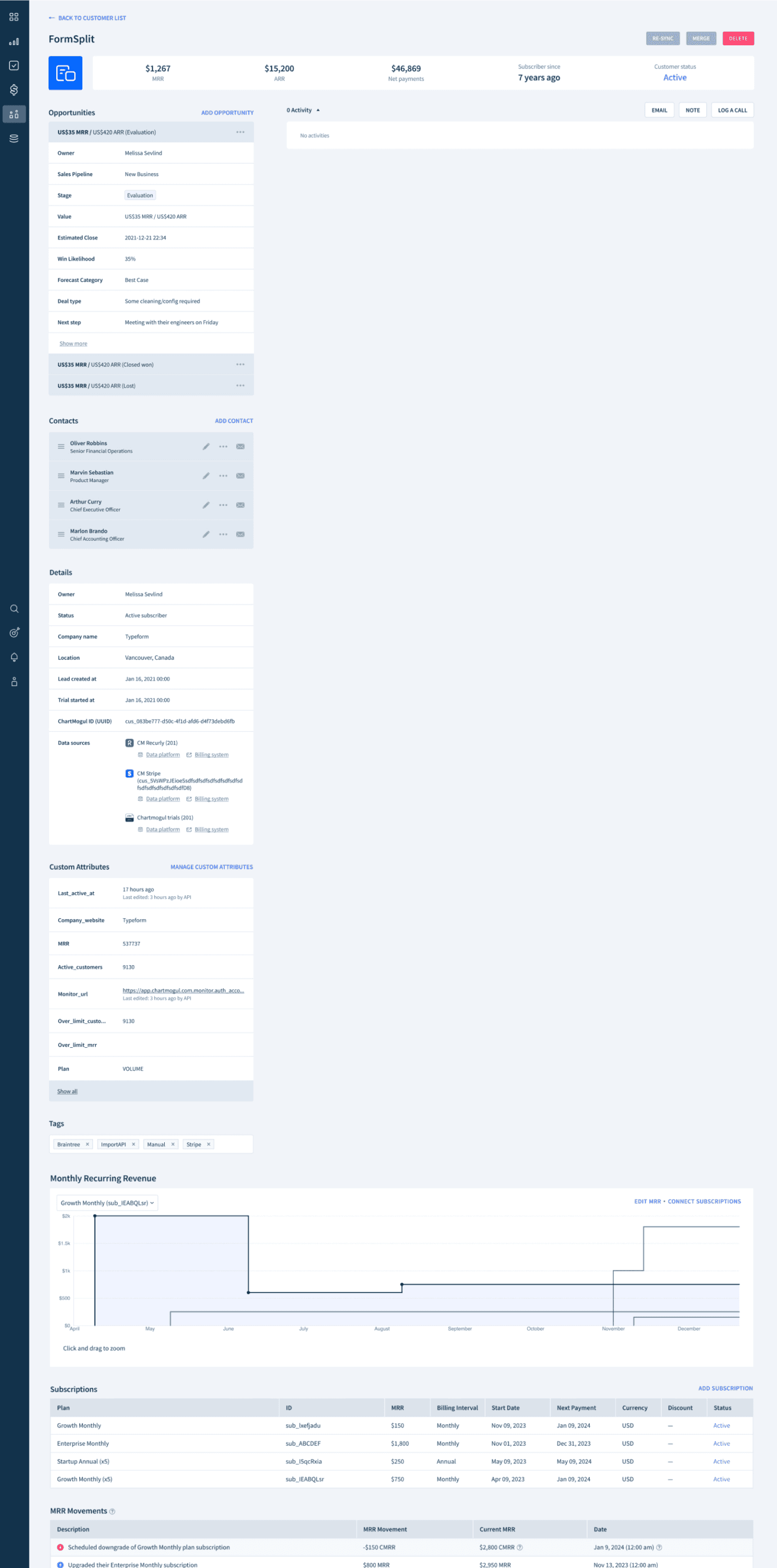
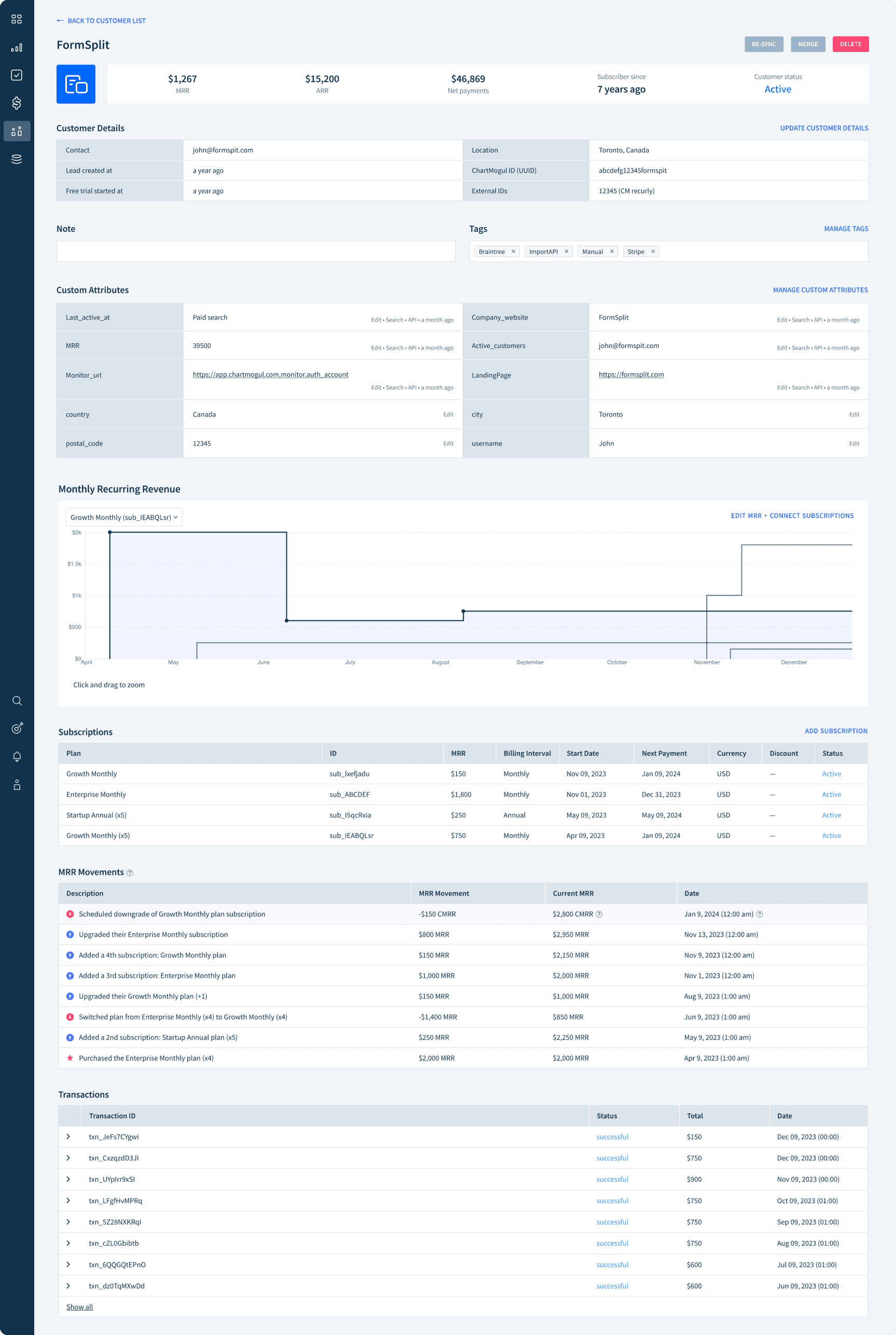
After CRM feature release, many customers wanted the previous version of the profile page, especially from non-CRM users. The change occasionally made huge empty space.

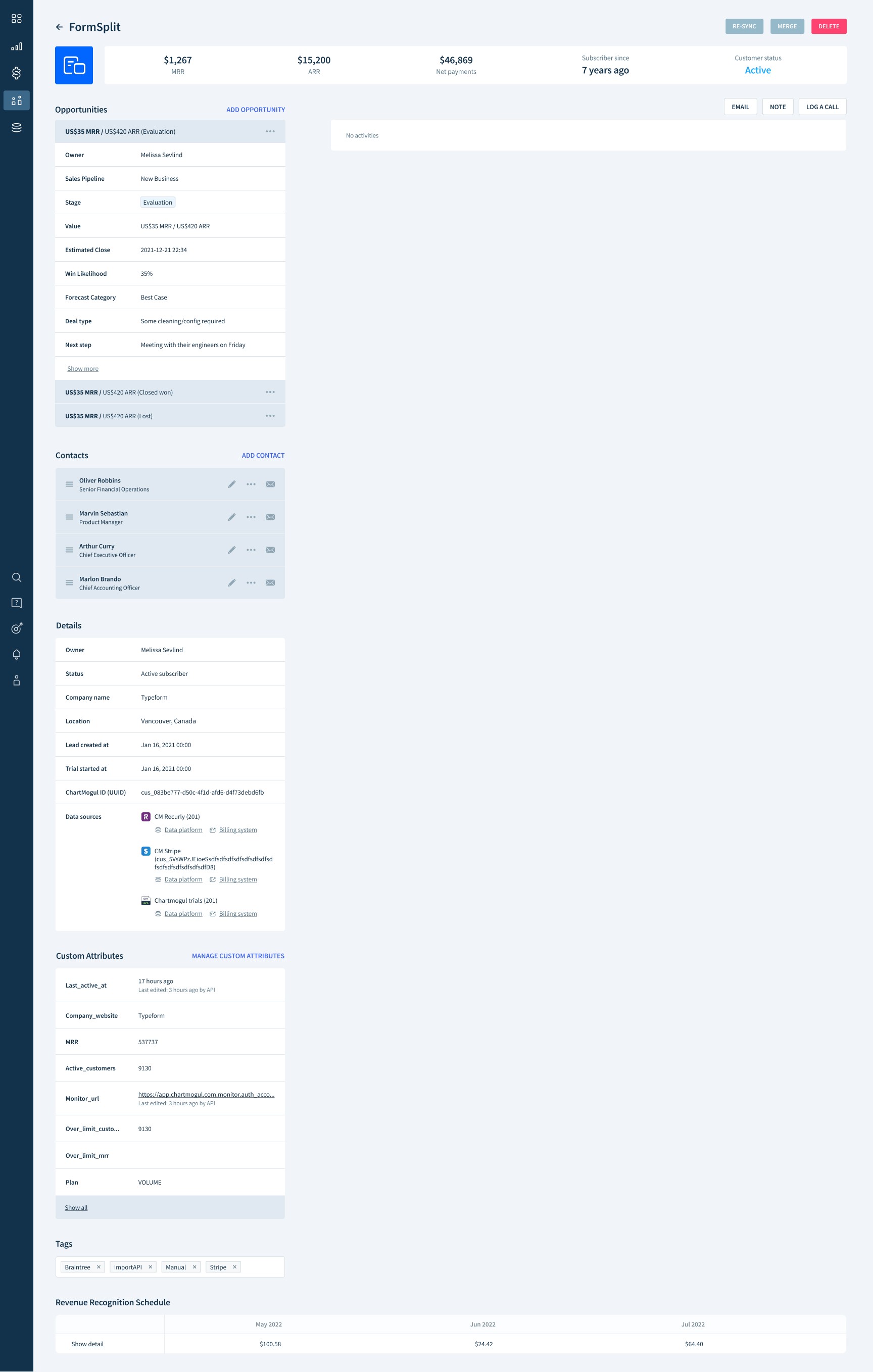
We restructured the entire customer page, introducing communication tracks. However, this revamp inadvertently left the right section barren for users who weren't active CRM users. Meanwhile, the left-hand section remained populated with numerous elements. The imbalance forced users to scroll extensively to access essential information, leading to inconvenience and suboptimal user experiences among certain user segments.

Empty space

Empty space

Feedback from the users who didn’t actively use CRM:

“I'm struggling with the new UX changes. Recently a giant empty "Activities" area exists under any customer I look up. It means I now need to scroll down to see the units chart and subscriptions information which is slowing me down. Is there a way I can go back to the old view and remove the giant activities area?”

“I'm struggling with the new UX changes. Recently a giant empty "Activities" area exists under any customer I look up. It means I now need to scroll down to see the units chart and subscriptions information which is slowing me down. Is there a way I can go back to the old view and remove the giant activities area?”

“I'm struggling with the new UX changes. Recently a giant empty "Activities" area exists under any customer I look up. It means I now need to scroll down to see the units chart and subscriptions information which is slowing me down. Is there a way I can go back to the old view and remove the giant activities area?”

“Is it possible to customize the customer profile design? The custom attributes are now on the left, and there is a large empty space on the right. The old one, with the custom attributes table divided on both sides, was easier to work with.”

“Is it possible to customize the customer profile design? The custom attributes are now on the left, and there is a large empty space on the right. The old one, with the custom attributes table divided on both sides, was easier to work with.”

“Is it possible to customize the customer profile design? The custom attributes are now on the left, and there is a large empty space on the right. The old one, with the custom attributes table divided on both sides, was easier to work with.”

“The UI real estate that has been allocated for activities on the contact records is a waste. My team will never be using your product as a CRM as we are a CRM vendor. If possible, I would like to have the UI switched to the previous view.”

“The UI real estate that has been allocated for activities on the contact records is a waste. My team will never be using your product as a CRM as we are a CRM vendor. If possible, I would like to have the UI switched to the previous view.”

“The UI real estate that has been allocated for activities on the contact records is a waste. My team will never be using your product as a CRM as we are a CRM vendor. If possible, I would like to have the UI switched to the previous view.”

How might we enable users, including non-CRM users, to efficiently access and view customer profile information?

Goals

Ensure the new customer page serves a wide range of users effectively

Consolidate a comprehensive array of information onto a single, compact page

Design Exploration

I’ve come up with a lot of design options for the current profile page through many iterations. 

As we went through this ideation process, we could get to the clear approach over time.

Solution 1. Chip UI for better accessibility to the each element on the page
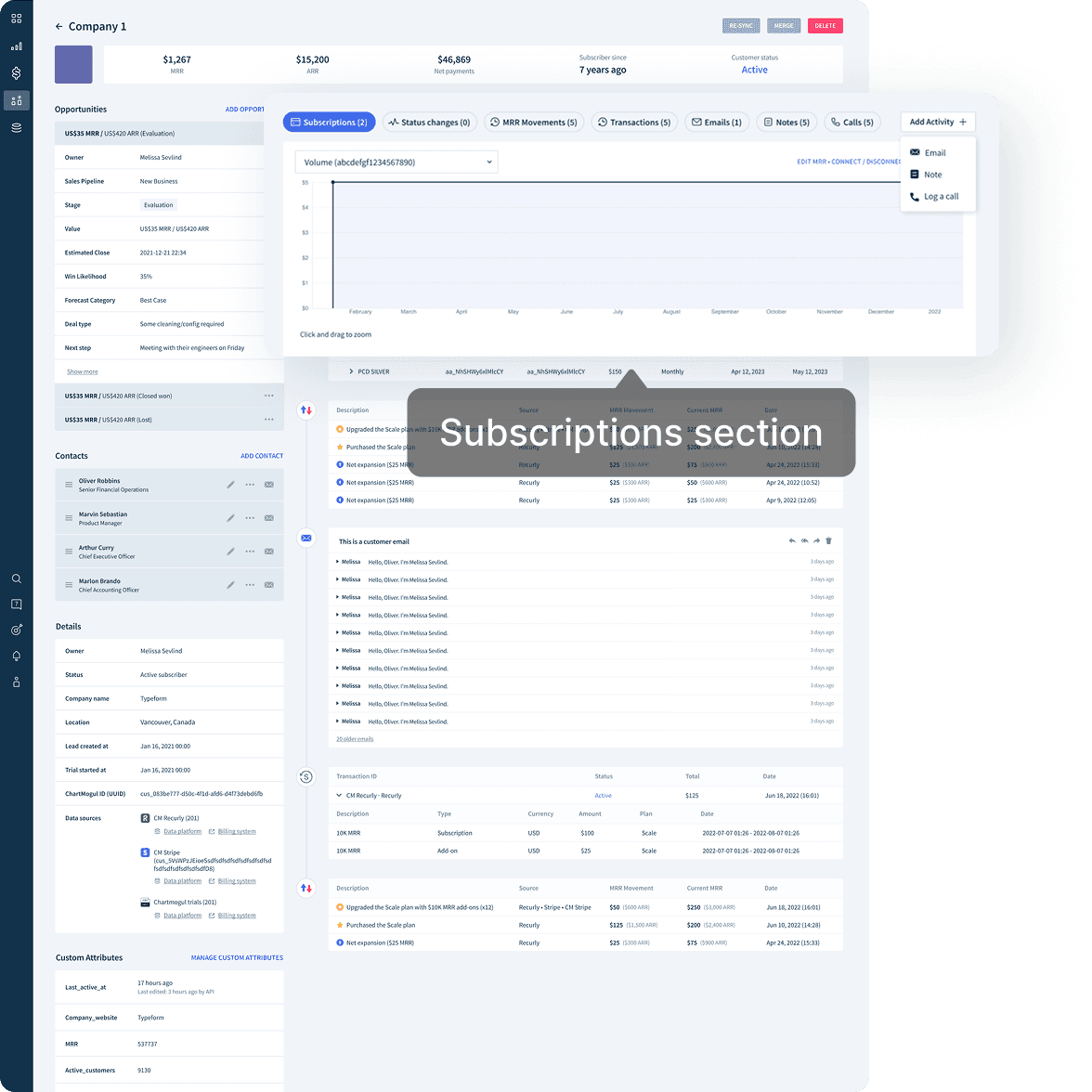
In these design approaches, Subscriptions section ended up limiting the access to the other activities, which is the key section for CRM.

In these design approaches, Subscriptions section ended up limiting the access to the other activities, which is the key section for CRM.

In these design approaches, Subscriptions section ended up limiting the access to the other activities, which is the key section for CRM.

Solution 2. Separate sections into 3 taps for easier navigation
The 3 split taps stopped viewing customer profile information and CRM related section at a glance.

The 3 split taps stopped viewing customer profile information and CRM related section at a glance.

The 3 split taps stopped viewing customer profile information and CRM related section at a glance.

Design principles

Simple user workflow

Simple user workflow

Simple user workflow

We emphasized a user-friendly and intuitive design, ensuring that users can access essential elements without unnecessary steps or complexity.

We emphasized a user-friendly and intuitive design, ensuring that users can access essential elements without unnecessary steps or complexity.

We emphasized a user-friendly and intuitive design, ensuring that users can access essential elements without unnecessary steps or complexity.

Feasibility

Feasibility

Feasibility

We placed a strong emphasis on evaluating the time & effort required for design implementation. This was a pivotal factor in our strategy to expedite the delivery of these enhancements.

We placed a strong emphasis on evaluating the time & effort required for design implementation. This was a pivotal factor in our strategy to expedite the delivery of these enhancements.

We placed a strong emphasis on evaluating the time & effort required for design implementation. This was a pivotal factor in our strategy to expedite the delivery of these enhancements.

User feedback

User feedback

User feedback

After finalizing the initial design version, we sought feedback from our internal users. This valuable process provided us with insights and a deeper understanding of the specific elements users would seek on the page.

After finalizing the initial design version, we sought feedback from our internal users. This valuable process provided us with insights and a deeper understanding of the specific elements users would seek on the page.

After finalizing the initial design version, we sought feedback from our internal users. This valuable process provided us with insights and a deeper understanding of the specific elements users would seek on the page.

Design Strategy

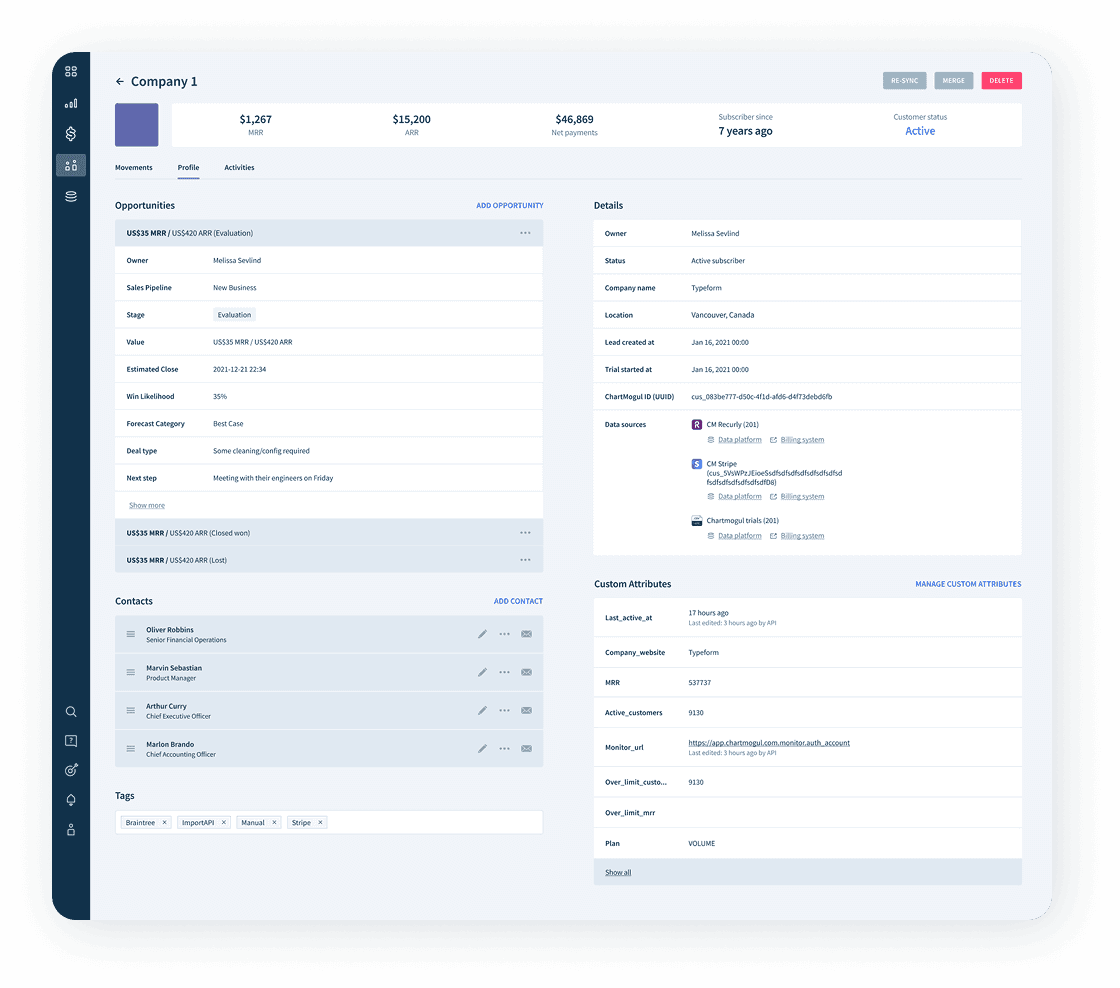
Create 2 Tabs: “Profile” and “Subscriptions”
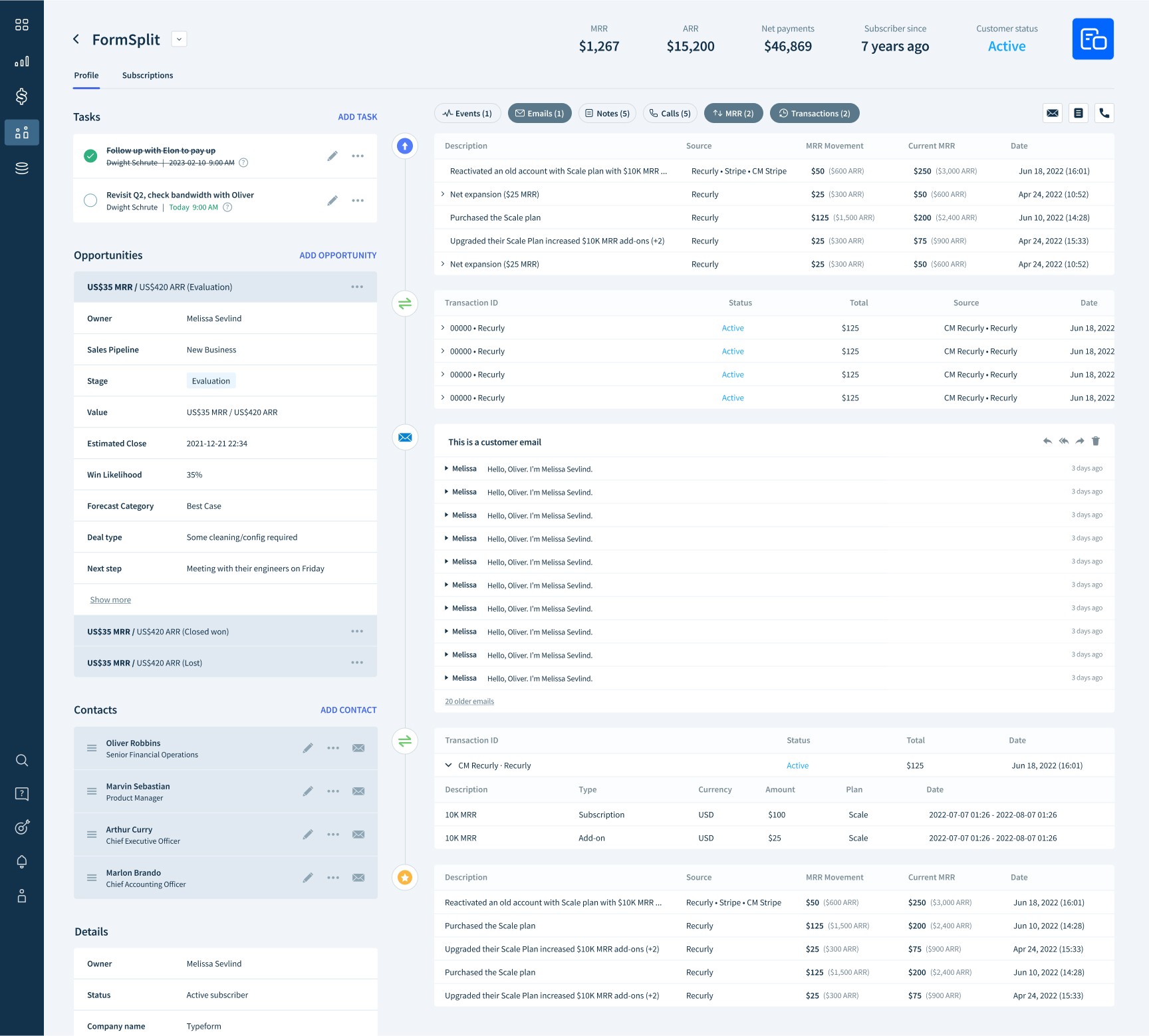
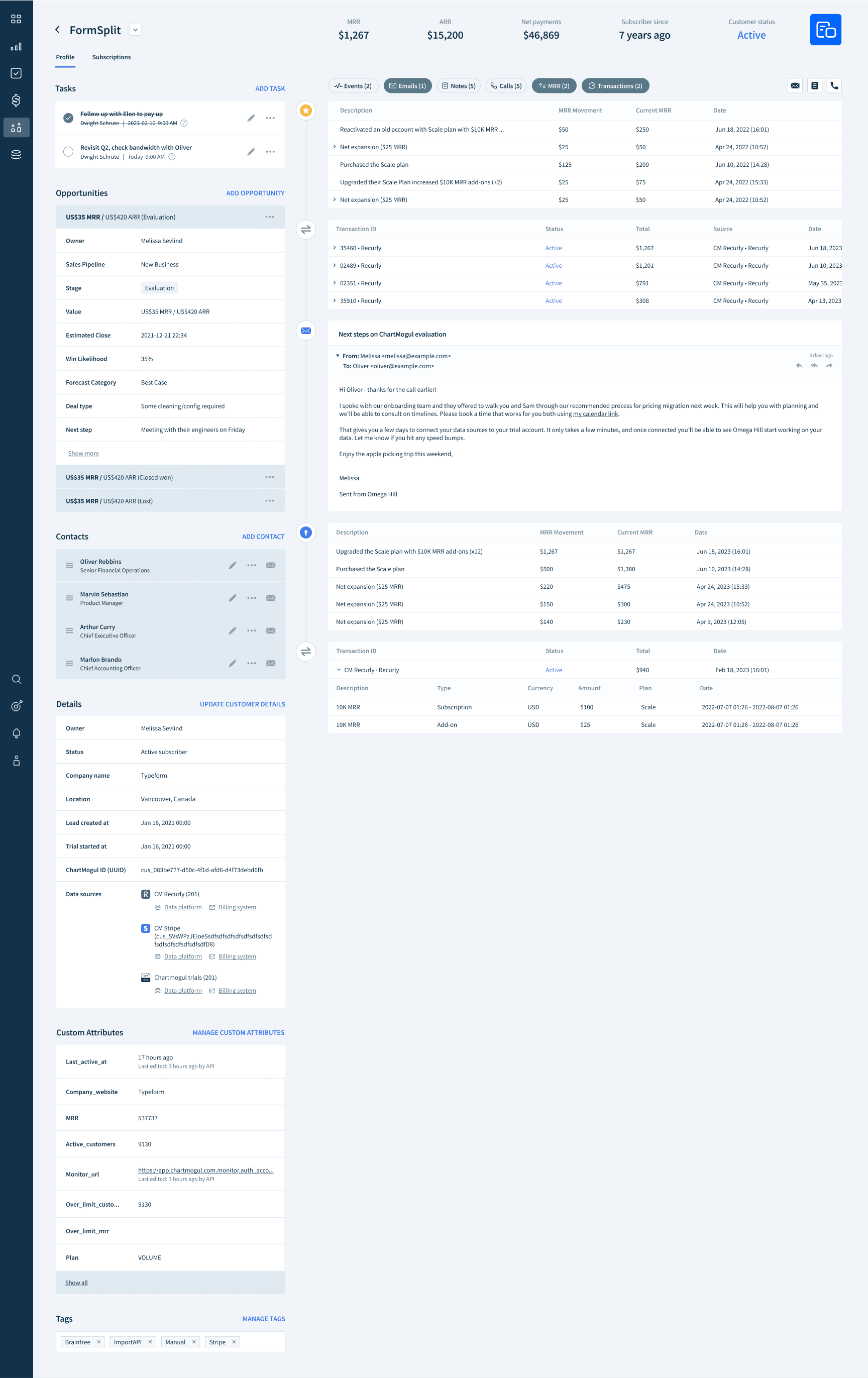
To prevent users to be bothered to scroll to the bottom of the page to view some elements, we created a new tab bar to navigate between user’s profile and subscription information.

To prevent users to be bothered to scroll to the bottom of the page to view some elements, we created a new tab bar to navigate between user’s profile and subscription information.

To prevent users to be bothered to scroll to the bottom of the page to view some elements, we created a new tab bar to navigate between user’s profile and subscription information.

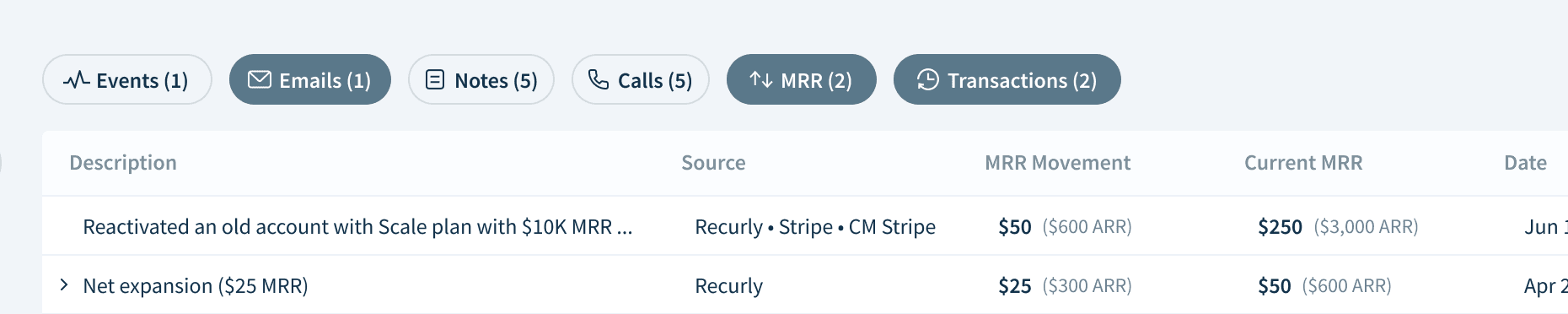
Transforming dropdown UI to chips

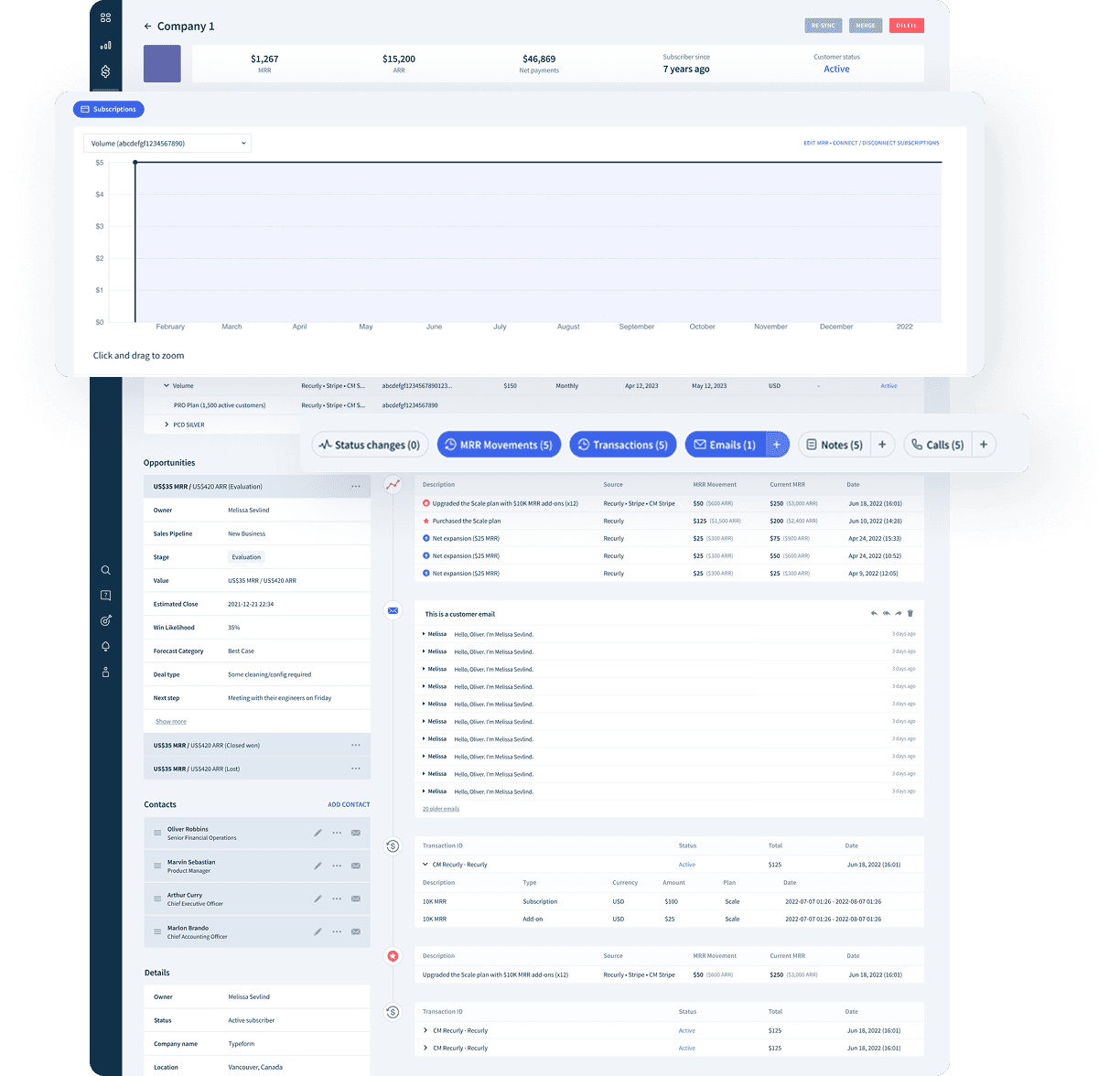
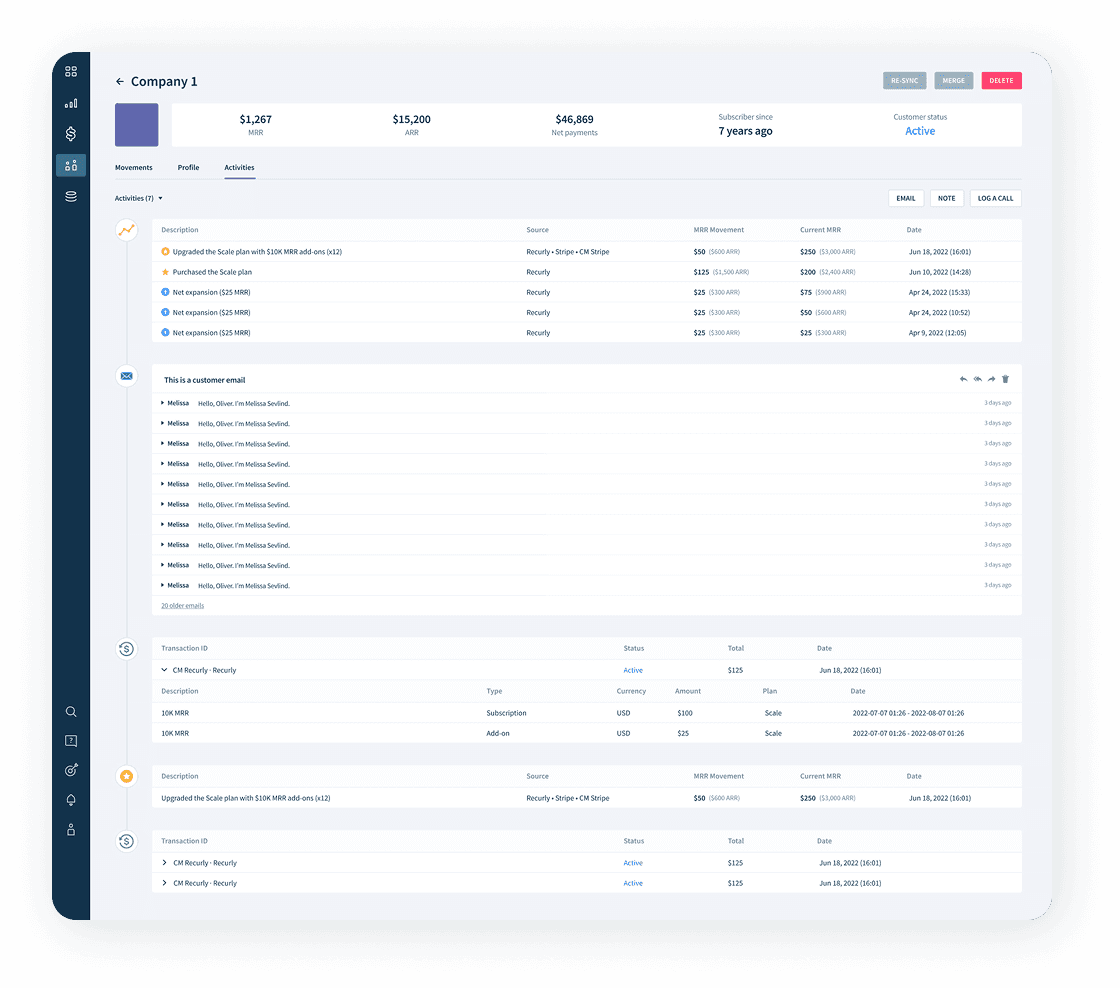
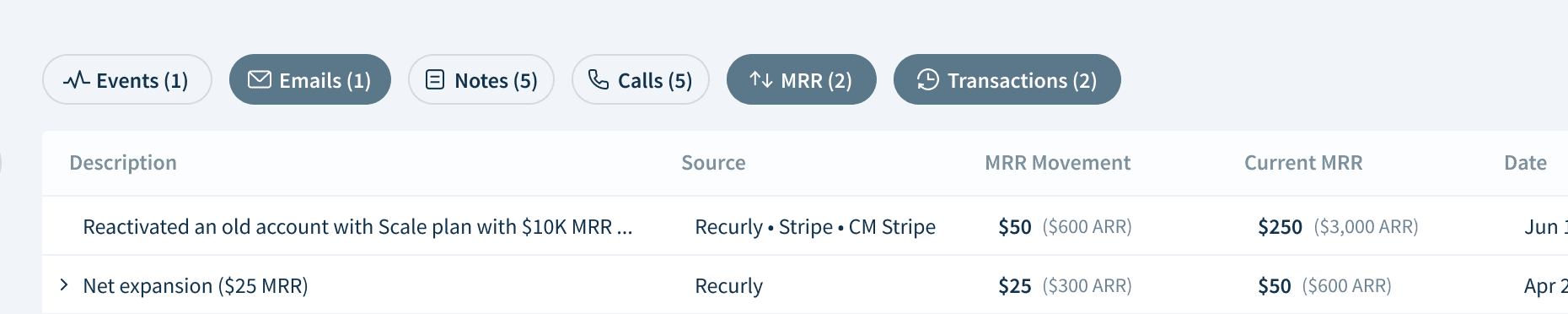
We introduced filter chips for quicker filtering of the feed as we added more elements in the right activity section.

We introduced filter chips for quicker filtering of the feed as we added more elements in the right activity section.

We introduced filter chips for quicker filtering of the feed as we added more elements in the right activity section.

Activity section

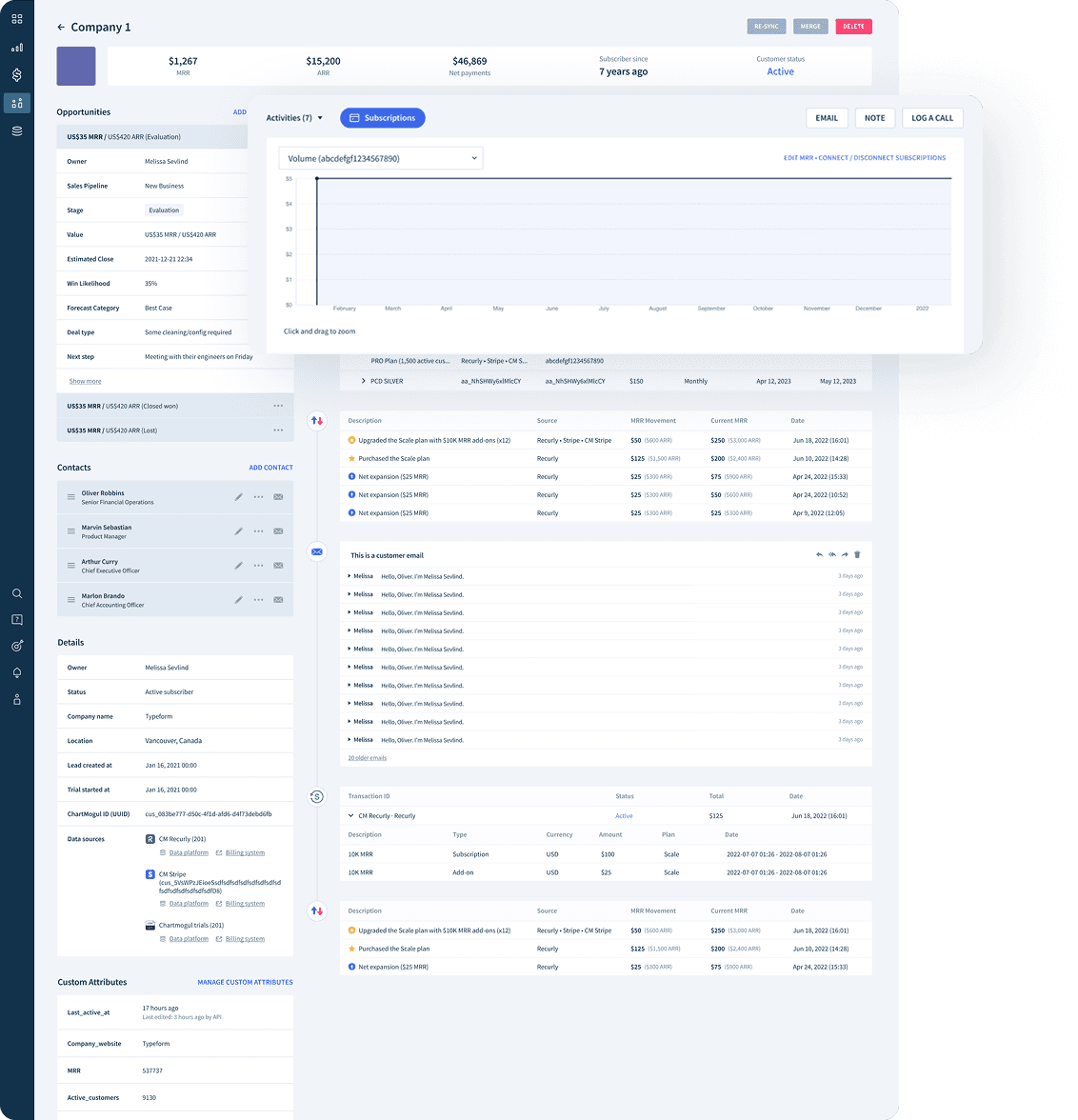
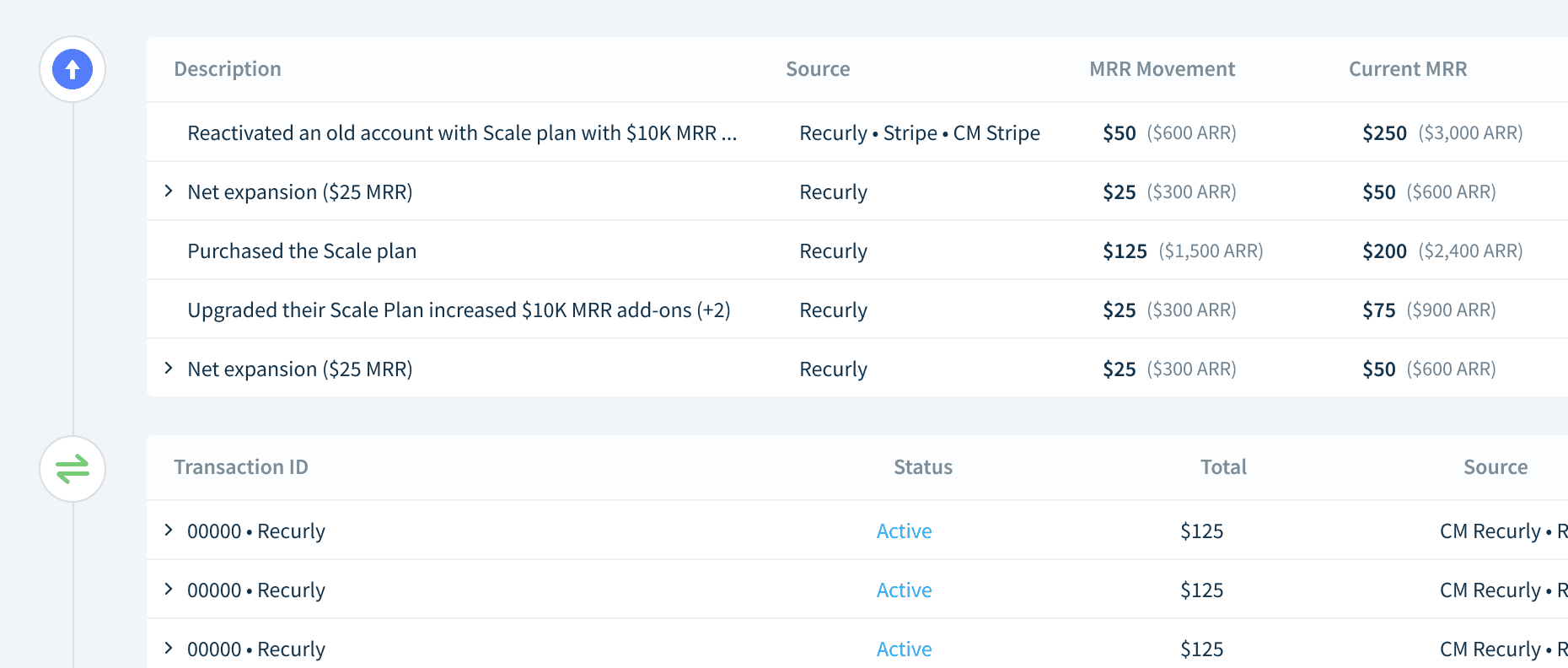
We integrated "MRR Movements" and "Transactions" that were located at the bottom of the page into the "Activity" section, placing them within the right-hand activity feed to allow users to view their important data without a long scroll.

We integrated "MRR Movements" and "Transactions" that were located at the bottom of the page into the "Activity" section, placing them within the right-hand activity feed to allow users to view their important data without a long scroll.

We integrated "MRR Movements" and "Transactions" that were located at the bottom of the page into the "Activity" section, placing them within the right-hand activity feed to allow users to view their important data without a long scroll.

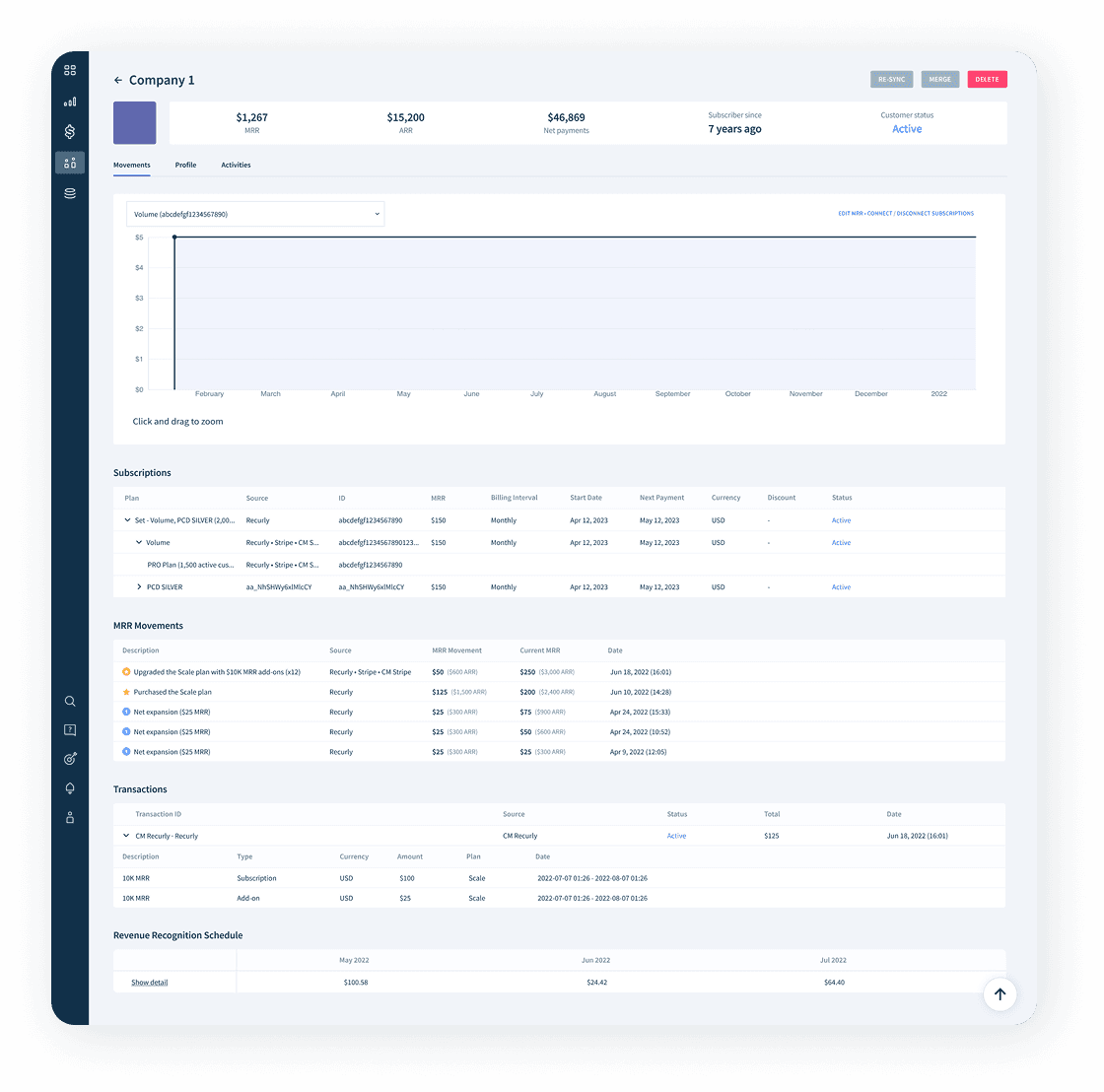
Subscriptions tab

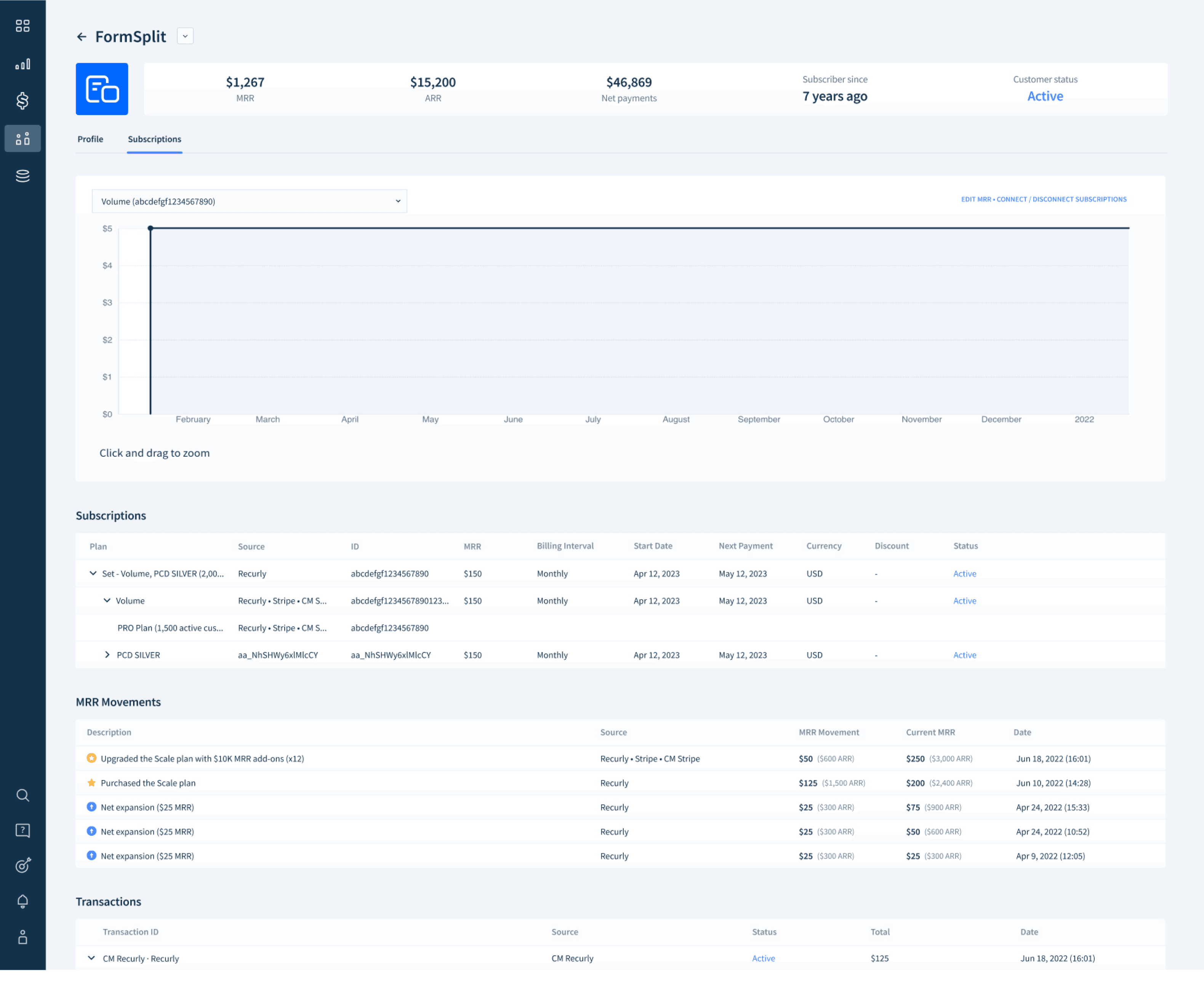
We divided the page into two tabs, and included the MRR chart, Subscriptions Table, MRR Movements, and Transactions tables in “Subscriptions” tab without other elements. Users can access this tab to easily review their subscription information without the need for extensive scrolling.

We divided the page into two tabs, and included the MRR chart, Subscriptions Table, MRR Movements, and Transactions tables in “Subscriptions” tab without other elements. Users can access this tab to easily review their subscription information without the need for extensive scrolling.

We divided the page into two tabs, and included the MRR chart, Subscriptions Table, MRR Movements, and Transactions tables in “Subscriptions” tab without other elements. Users can access this tab to easily review their subscription information without the need for extensive scrolling.

Header design

In addition to redesigning the main section of the customer profile, we recognized the potential for greater impact by reducing the vertical space occupied by the header. This change allows users to access the main section of the page more efficiently. After considering various design approaches, I have come up with the most suitable solution that aligns with the existing layout.

In addition to redesigning the main section of the customer profile, we recognized the potential for greater impact by reducing the vertical space occupied by the header. This change allows users to access the main section of the page more efficiently. After considering various design approaches, I have come up with the most suitable solution that aligns with the existing layout.

In addition to redesigning the main section of the customer profile, we recognized the potential for greater impact by reducing the vertical space occupied by the header. This change allows users to access the main section of the page more efficiently. After considering various design approaches, I have come up with the most suitable solution that aligns with the existing layout.

Design outcome

Implementation

Implementation

Implementation

As we've moved forward in the development process, we've identified several areas where we can further enhance and refine certain design details.

Before

Before

Before

After

After

After

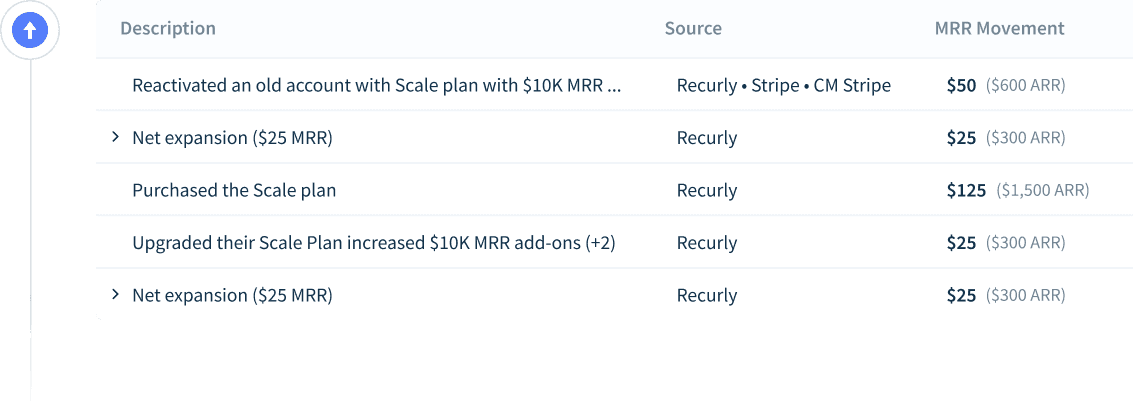
Handling the view of MRR Movements table

Handling the view of MRR Movements table

Handling the view of MRR Movements table

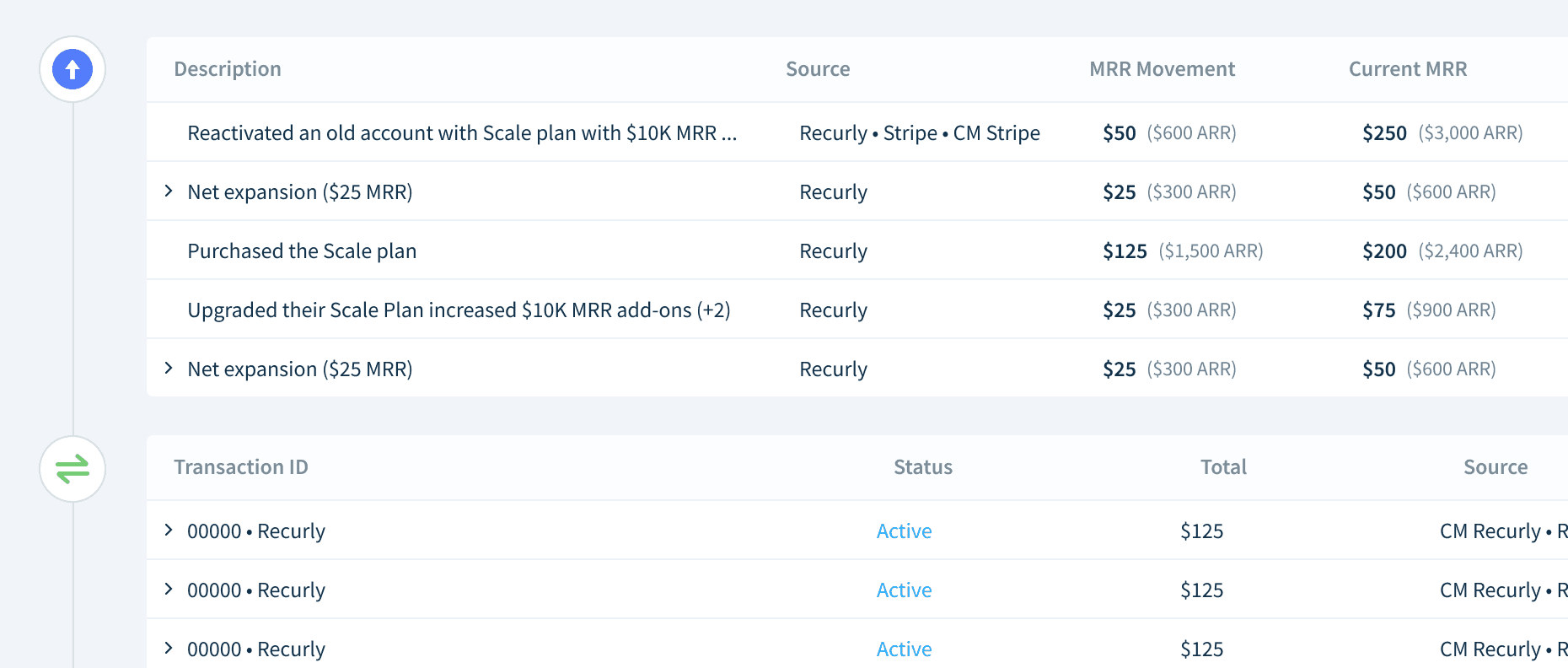
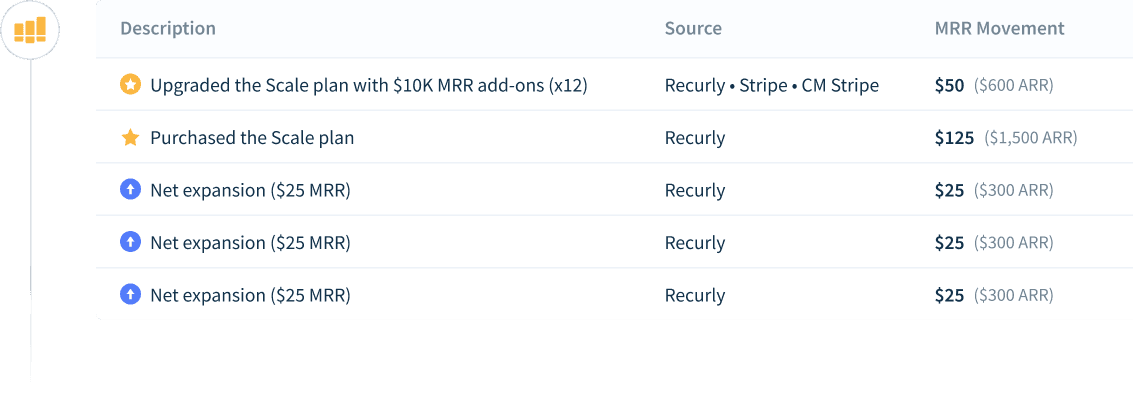
Regarding the presentation of the MRR Movements table, our initial design approach involved displaying a single type of icon within the timeline element and showing icons for each MRR Movement type. However, in our pursuit of a more intuitive design, we engaged in brainstorming sessions to explore alternative options. Ultimately, we decided to showcase the most representative icons for specific groups within the table.

Regarding the presentation of the MRR Movements table, our initial design approach involved displaying a single type of icon within the timeline element and showing icons for each MRR Movement type. However, in our pursuit of a more intuitive design, we engaged in brainstorming sessions to explore alternative options. Ultimately, we decided to showcase the most representative icons for specific groups within the table.

Regarding the presentation of the MRR Movements table, our initial design approach involved displaying a single type of icon within the timeline element and showing icons for each MRR Movement type. However, in our pursuit of a more intuitive design, we engaged in brainstorming sessions to explore alternative options. Ultimately, we decided to showcase the most representative icons for specific groups within the table.

Design iterations

Before CRM release

Before CRM release

After CRM release (2023.04)

After CRM release (2023.04)

Updated design (2023.11)

Updated design (2023.11)

Conclusion

Many users expressed satisfaction with the redesigned page. But we must continue to consider the needs of certain user groups that do not use the CRM feature.

Results

We provided early access to users who expressed dissatisfaction with the previous design to gather their feedback on the design changes.

I gathered the users’ info that sent us negative feedback on the previous customer profile page, and we sent emails to inform the design changes, giving early access to test it. After that, we received a couple of meaningful feedback that we should consider the further improvements based on their user role and their business model.

I gathered the users’ info that sent us negative feedback on the previous customer profile page, and we sent emails to inform the design changes, giving early access to test it. After that, we received a couple of meaningful feedback that we should consider the further improvements based on their user role and their business model.

I gathered the users’ info that sent us negative feedback on the previous customer profile page, and we sent emails to inform the design changes, giving early access to test it. After that, we received a couple of meaningful feedback that we should consider the further improvements based on their user role and their business model.

“I like it. I was unhappy that the CRM was forced onto my instance when I didn't ask for it and it created a lot of white space if you're not a user of it so the tabs system helps that. Still wish I could hide all the CRM related bits. I noticed the events section was slow to load on Clio which has lots of events. I would like it if I could swap the tabs around and have Subscriptions as the default one.”


- Customer A

“I like it. I was unhappy that the CRM was forced onto my instance when I didn't ask for it and it created a lot of white space if you're not a user of it so the tabs system helps that. Still wish I could hide all the CRM related bits. I noticed the events section was slow to load on Clio which has lots of events. I would like it if I could swap the tabs around and have Subscriptions as the default one.”

- Customer A

“I like it. I was unhappy that the CRM was forced onto my instance when I didn't ask for it and it created a lot of white space if you're not a user of it so the tabs system helps that. Still wish I could hide all the CRM related bits. I noticed the events section was slow to load on Clio which has lots of events. I would like it if I could swap the tabs around and have Subscriptions as the default one.”

- Customer A

“While I certainly understand that CRM is the new focus for ChartMogul, these changes are not a benefit to us. We are only using analytics, and honestly, I'd love to see an integration with Salesforce. We spend a lot of time and energy moving data from Salesforce into ChartMogul. There's nothing inherently bad about this update, but it does split up customer details and subscription details. If I'm working on sales opportunities, that makes sense. But when I'm trying to get a quick profile of the customer, I need to see our segmentation fields and subscription history at the same time. ...


- Customer B

“While I certainly understand that CRM is the new focus for ChartMogul, these changes are not a benefit to us. We are only using analytics, and honestly, I'd love to see an integration with Salesforce. We spend a lot of time and energy moving data from Salesforce into ChartMogul. There's nothing inherently bad about this update, but it does split up customer details and subscription details. If I'm working on sales opportunities, that makes sense. But when I'm trying to get a quick profile of the customer, I need to see our segmentation fields and subscription history at the same time. ...”

- Customer B

“While I certainly understand that CRM is the new focus for ChartMogul, these changes are not a benefit to us. We are only using analytics, and honestly, I'd love to see an integration with Salesforce. We spend a lot of time and energy moving data from Salesforce into ChartMogul. There's nothing inherently bad about this update, but it does split up customer details and subscription details. If I'm working on sales opportunities, that makes sense. But when I'm trying to get a quick profile of the customer, I need to see our segmentation fields and subscription history at the same time. ...”

- Customer B

Takeaway

Experience designing a table containing numerical items

During the process of designing the MRR Movement and transaction tables, I faced the challenge of effectively displaying complex numerical data. Initially, I had limited understanding of how these values should be presented. However, this experience served as valuable design practice, especially in the context of business product tables.

During the process of designing the MRR Movement and transaction tables, I faced the challenge of effectively displaying complex numerical data. Initially, I had limited understanding of how these values should be presented. However, this experience served as valuable design practice, especially in the context of business product tables.

During the process of designing the MRR Movement and transaction tables, I faced the challenge of effectively displaying complex numerical data. Initially, I had limited understanding of how these values should be presented. However, this experience served as valuable design practice, especially in the context of business product tables.

Opportunity to extend design ideas

Working on this long-term project provided me with valuable opportunities to explore various design approaches, engage in discussions with stakeholders, and test out different ideas. Throughout this journey, I needed to apply creativity, gain a deeper understanding of user needs, and align with the product's logic. These experiences significantly expanded my design thinking and perspective.

Working on this long-term project provided me with valuable opportunities to explore various design approaches, engage in discussions with stakeholders, and test out different ideas. Throughout this journey, I needed to apply creativity, gain a deeper understanding of user needs, and align with the product's logic. These experiences significantly expanded my design thinking and perspective.

Working on this long-term project provided me with valuable opportunities to explore various design approaches, engage in discussions with stakeholders, and test out different ideas. Throughout this journey, I needed to apply creativity, gain a deeper understanding of user needs, and align with the product's logic. These experiences significantly expanded my design thinking and perspective.

Lack of chances of user testing

I was eager to conduct user testing to evaluate the success of our design before implementing the updates, but unfortunately, I didn't have the opportunity to do so. However, I believe that user testing would be valuable for further improvements in the future.

I was eager to conduct user testing to evaluate the success of our design before implementing the updates, but unfortunately, I didn't have the opportunity to do so. However, I believe that user testing would be valuable for further improvements in the future.

I was eager to conduct user testing to evaluate the success of our design before implementing the updates, but unfortunately, I didn't have the opportunity to do so. However, I believe that user testing would be valuable for further improvements in the future.

Create a free website with Framer, the website builder loved by startups, designers and agencies.